The Modem Agent
Ask questions, find patterns, and take action using natural language
The Modem Agent is a cloud agent that answers questions about your user feedback, finds patterns, and takes action.
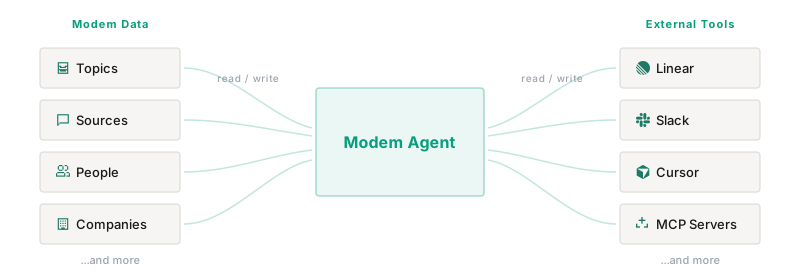
It works directly with your Modem data (topics, sources, people, companies) and reads from and writes to your connected tools, like Linear, Slack, and GitHub. Talk to it in the Modem dashboard, Slack, or Discord. Or plug it into the agent you already use: ChatGPT, Claude, Cursor, and other MCP clients can hand work to it as a subagent through the Modem MCP server. Either way, you describe what you need in plain language, and the agent queries your data, reasons over it, and acts on your behalf.
Where to Use It
Dashboard
There are two ways to use the agent in the Modem dashboard:
- Full-screen. Click Agent in the sidebar for a dedicated, full-screen chat experience.
- Sidebar. From any page, click Agent in the top-right corner to open the agent as a sidebar panel. The agent stays open as you navigate, so you can chat while you work.
When the sidebar is open, the agent is aware of the page you’re on and the data you’re looking at. On list pages, like Topics or People, you can check specific rows and those items are automatically added to the agent’s context. Think of it like selecting code in an IDE before asking a question: the agent knows exactly what you’re referring to.
Slack
DM the Modem bot or @mention it in any channel where it’s been added. The agent responds in-thread.
Discord
@mention the Modem bot in a channel it can read. The agent replies in a thread named after your message. To follow up, @mention the bot again in that thread and it continues the same conversation; messages that don’t mention the bot are ignored. If it can’t create a thread, it replies in the channel. The bot doesn’t accept DMs.
In the dashboard, Slack, and Discord, the agent maintains context within a conversation, so you can ask follow-up questions to drill into results.
MCP clients
MCP clients connected to the Modem MCP server can start and follow agent runs with modem_agent_invoke and the other modem_agent_* tools.
Choosing the Agent’s Model
The agent model is the model the agent runs on. An admin sets it for the whole organization in Settings → Agent Model, by choosing Auto or a tier. Members can see the current choice but can’t change it.
| Option | Runs on today | Suited to |
|---|---|---|
| Auto (default) | Modem’s choice | Leaving the choice to Modem |
| Smart | Opus 5.5 | Hardest questions |
| Balanced | Sonnet 5.5 | Everyday work |
| Fast | Haiku 5.5 | Quick lookups |
A tier follows its model. When Modem moves a tier to a newer model, your organization moves with it, and you don’t need to change the setting. Settings → Agent Model shows the model each tier runs on today. Smart, Balanced, and Fast are the same tiers an automation’s Model setting offers.
The organization’s model applies to:
- The agent in Slack, Microsoft Teams, and Discord
- Agent runs started from MCP clients through the Modem MCP server
- New chats in the dashboard, which start on the model the tier runs on. Once you pick a different model in a chat’s model picker, your new chats in that browser start on your pick instead.
With Auto, Modem chooses the model in Slack, Microsoft Teams, Discord, and MCP runs. A dashboard chat runs on the model its picker shows, and with Auto a new chat starts on Modem’s default model.
A conversation already under way, including a Slack or Teams thread, keeps the model it started on. Automations use the Model setting on each automation instead.
Public Channels
A public channel is a conversation that people outside your organization can see. The agent treats these conversations as public:
- Slack. Slack Connect channels shared with another organization. A 1:1 DM with Modem is internal.
- Discord. Any channel that everyone in the server can view. A channel restricted to certain roles is internal, and a thread follows the channel it belongs to.
- Dashboard and MCP clients. Never public.
If Modem can’t confirm that a conversation is internal, it treats it as public.
In a public channel, the agent answers as your organization’s public-facing assistant instead of as a teammate. It looks things up and takes action as usual, but its reply changes:
- It answers in a single sentence, with no tables, lists, or cards.
- After an action, it confirms only the outcome and its identifier, without assignee, team, priority, status, labels, or internal links.
- It doesn’t reveal other customers, other channels, internal discussions, engineering issues, pull requests, or anything else in Modem from outside that conversation.
- Asked whether others have reported something, it checks and answers without details, for example that the team is aware of similar reports.
- If a teammate asks for internal details, it declines in one sentence and doesn’t point to another channel.
Modem Agent: Ticket ENG-1234 created to track this request.
In a public Slack channel, the agent doesn’t run actions that would normally ask for approval. It replies “This is a public channel, I can’t do that here.” and shows nothing about the attempted action. On Discord, those actions run as usual unless Disable agent messages to public Discord channels is on, in which case the agent declines them the same way.
Admins can also stop the agent from posting to public channels with its Slack or Discord tools. It still replies when mentioned there. The settings:
- Disable agent messages to Slack Connect channels, in Settings → Integrations → Slack
- Disable agent messages to public Discord channels, in Settings → Integrations → Discord
What It Can Do
Modem data
The agent has full access to your organization’s data in Modem. It can search, analyze, and take action on:
- Topics. Search and filter by type, priority, or time range. Update fields, merge related topics, and summarize trends across sources.
- Sources. Query the conversations, tickets, and issues linked to a topic and trace them back to where they came from.
- People. Look up profiles, merge duplicates, update details, and trigger enrichment.
- Companies. Create companies, add people, update details, and trigger enrichment.
- Automations. Create scheduled or event-triggered automations, then edit, pause, resume, run immediately, or delete them.
External tools
The agent can also read from and write to your connected integrations:
- Linear. Create and update issues, add comments, search the backlog.
- Slack. Post messages and summaries to channels, DM individual users.
- GitHub. Query issues, pull requests, and discussions, and create issues with your approval.
- Coding agents. Delegate implementation tasks to Claude Agent, Cursor, or Devin.
- Custom tools (MCP). Use any external tools you’ve connected via MCP servers.
Some actions require confirmation before the agent executes them. See advanced examples below.
Built-in tools
The agent also has a few general-purpose tools that don’t require any integration setup:
- Web search. Search the web to supplement its answers with up-to-date information.
- Image generation. Generate images from text descriptions, useful for drafting visuals or diagrams.
Advanced Examples
The agent is most powerful when it combines your Modem data with external tools in a single workflow. Instead of manually cross-referencing feedback, triaging issues, and notifying stakeholders, you can ask the agent to do it all at once.
Weekly feedback digest
Pair the agent with an automation to get recurring summaries or react to new events without reading every message.
Set this as a weekly automation and Modem will deliver the digest to your inbox every Monday.
High-priority topic alerts
The agent can also create trigger automations that react as soon as something changes in Modem or GitHub.
Backlog grooming
The agent can cross-reference user feedback with your Linear backlog to find gaps, duplicates, and priority mismatches.
Modem Agent: I found 14 bug report topics from the last 2 weeks. Here’s what I did:
- Created 3 new issues: Export timeout (8 reports), mobile crash on Android 14 (4 reports), broken CSV import (3 reports)
- Flagged 2 priority mismatches: ENG-341 “OAuth token refresh failure” is marked Low but has 12 complaints this week. ENG-289 “Search returns stale results” is Medium but 6 users reported it in the last 3 days.
- Already tracked: 9 topics already had linked Linear issues.
Personalized release notes
You shipped a feature, but who asked for it? The agent can trace feedback back to specific users and draft targeted announcements.
Modem Agent: 23 users requested dark mode over the past 6 months. Here are the top requesters:
- Sarah at Acme Corp (3 requests): Mentioned eye strain during late-night debugging sessions
- DevTeam at StartupXYZ (2 requests): Wanted it for customer demos to match their brand
- Marcus (Discord): Asked specifically about OLED battery savings
Draft release note for Sarah: “Remember when you mentioned eye strain during those late-night debugging sessions? Dark mode is here.”
Identify product champions
The agent can analyze engagement patterns to find your most active and invested users, perfect for beta programs, case studies, or advisory boards.
Modem Agent: Here are your top engaged users from Q1, ranked by message volume and topic participation:
- Jake at Dataflow (47 messages, 12 topics): Frequent feature requester, especially around API and webhooks. Already using your REST API extensively.
- Priya at Orion Labs (38 messages, 9 topics): Active in #support and #feedback. Reports detailed bug reproductions with logs.
- Chris at Novexa (31 messages, 8 topics): Power user in Discord. Helps other users troubleshoot and has asked about programmatic access twice.
All three have discussed API-related topics. Want me to draft an invite message?