Ingest API
Send conversations from your own tools into Modem
The ingest API lets you push conversations from tools Modem does not natively connect to. You describe the places where conversations happen (a chat channel, a support ticket, a tracked issue) as source containers, then send the messages that belong to each one. Modem processes each source container’s messages in order and aggregates what it finds into topics alongside your built-in integrations.
This is a server-to-server API. It is designed for a small sync service or webhook handler that you run, not for browser or mobile code.
How Modem organizes ingested data
Modem’s processing pipeline works on three things:
| Entity | What it is | Identified by |
|---|---|---|
| Source | A tool that produces conversations: your team chat, your help desk, your issue tracker. | source_name, a slug you choose |
| Source container | One unit of conversation inside a source: a chat channel, a support ticket, a tracked issue, an email thread. Has a kind and a lifecycle state. |
source_name + kind + external_id |
| Message | One post, comment, or reply inside a source container. | source_name + source_message_type + source_message_id |
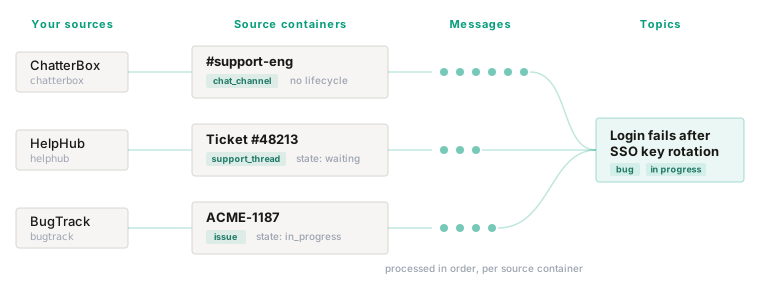
Source containers are the unit of processing. Modem drains each source container’s messages serially, uses the source container’s title, description, and kind as context for extraction, and reads the source container’s lifecycle state (open, in progress, done, and so on) as evidence for whether the underlying work is resolved. A message is not processed until the source container it references exists.
Read Source Containers first. It explains the source container kinds, how to pick a source container’s identity, and how to map your tool’s statuses onto Modem’s lifecycle states. Then read Messages for the message payload.
The protocol
Every integration sends the same three things, in this order.
Create the source container
Send a source_container.created event the first time you see a channel, ticket, issue, or thread. This is a full snapshot: kind, identity, title, description, and lifecycle state.
Send messages that reference it
Send a message.created event for each post or comment. Every message carries a source_container: { kind, external_id } reference pointing at the source container it belongs to.
Keep the source container up to date
When the source container changes in your tool (a ticket is closed, an issue is reopened, a channel is archived), send a source_container.updated event with the new snapshot. State changes are evidence Modem uses when it assesses the lifecycle of the topics that source container contributes to.
Authentication
Send your project key in the x-modem-public-key header.
x-modem-public-key: modem_<32_hex_characters>Project keys are managed per project, not per organization.
To get a key:
- Open your organization in the Modem dashboard.
- Go to Settings → Public Keys.
- Create a key or copy an existing active key.
The Public Keys page manages the keys for your organization’s default project.
Only org admins and owners can create, deactivate, or revoke keys.
Endpoint
POST https://ingest.modem.dev/ingest
Content-Type: application/json
Every request carries exactly one event:
curl -X POST https://ingest.modem.dev/ingest \
  -H "Content-Type: application/json" \
  -H "x-modem-public-key: $MODEM_PUBLIC_KEY" \
  -d '{ ... }'
Event envelope
| Field | Required | Notes |
|---|---|---|
event_type |
Yes | One of the event types below |
created_at |
Yes | ISO 8601 timestamp for when your integration observed this event. See the note below |
client |
Yes | Producer metadata for the integration sending the event |
body |
Yes | Event payload; shape depends on event_type |
source_nonce |
No | Upstream delivery ID for deduplication. Read Deduplication before using this |
Modem assigns received_at internally when the event is accepted. Do not send it.
client
client.name identifies the producer that submitted the event.
- Use a lowercase package-style identifier such as
@your-company/helphub-sync. @modem/*is reserved for Modem-managed integrations.- For custom sources,
client.nameis descriptive metadata. Modem does not verify it. - A
@modem/*client name without Modem’s first-party credential returns403.
client.version must be a semantic version, for example 1.0.0.
Event types
event_type |
What it does | Documented in |
|---|---|---|
source_container.created |
Stands up a source container with a full snapshot | Source Containers |
source_container.updated |
Replaces the source container snapshot (state, title, timestamps) | Source Containers |
source_container.deleted |
Tombstones a source container | Source Containers |
message.created |
Stores a message and queues it for processing in its source container | Messages |
message.updated |
Updates a stored message’s content | Messages |
message.deleted |
Marks a message deleted and clears its content | Messages |
All six share the envelope above. Only body differs.
Choosing a source_name
source_name is the identity of a source inside your organization. It appears on every source container and message event from that source, and Modem hashes it into the deterministic IDs of everything the source produces.
- Use a stable lowercase slug, usually the name of the tool:
helphub,bugtrack,chatterbox. - Use separate names when one upstream app feeds Modem two distinct streams you want to keep apart:
helphub-support,helphub-sales. - Do not prefix custom sources with
custom_. - Built-in integration names (
slack,discord,github,linear,intercom, and so on) are reserved. Sending them with a non-Modemclient.namereturns400. - Do not rename a source later. A new slug is a new source identity, and existing source containers and messages will not carry over.
Responses
Successful requests return 200 OK. The event is queued; processing happens asynchronously.
{
    "success": true,
    "id": "0195789f-2a65-7c58-9c50-9dbf5fbc5f91",
    "message": "Event queued for processing",
    "details": {
        "textLength": 57,
        "sourceType": "helphub"
    }
}| Status | When it happens |
|---|---|
400 |
Invalid JSON, invalid schema, reserved source_name, or a message event with no extractable text content |
400 |
A source container kind outside the public set |
401 |
Missing or invalid project key |
403 |
A @modem/* client.name sent without Modem’s first-party credential |
405 |
Method other than POST |
500 |
Event could not be queued |
A 200 means the event was accepted, not that it was processed. Schema validation happens synchronously; everything after that is asynchronous.
Billing
Message events count toward your ingest usage. Source container events are not metered today. Still, send one source container event per source container (plus one per lifecycle change), not one per message.
Current limits
- Pull request, transcript, and social feed source containers are produced by Modem’s built-in integrations only. They are not yet available through this API. See Source container kinds.
- This endpoint is not yet part of the OpenAPI spec. The rest of the public API is documented under API Reference.
@modem/*client names require Modem’s first-party credential. Other client names are not verified.
Next steps
Source Containers
Source container kinds, identity, lifecycle state, and the source_container.* events.
Messages
The message payload, the source container reference, threading, and deduplication.
Integrations
Modem’s built-in integrations, which use this same model internally.
Security & Privacy
The security model for data sent to Modem.