
Unlock new workflows with smart triggers, powered by Jev

 Mike Clarke
Use Jev to control when Modem takes action.
At Modem, support tickets, calls, Slack messages, emails and in-app feedback from customers come in all day, and we want Modem's agent to act on them as they land - to alert your team, create tickets, or other agentic workflows. But that meant spinning up a full agent run per-event, even if there was nothing to act on.
Smart triggers change that. Now before spinning up the Modem agent, we first evaluate each event using Jev, the decision model from TypeSafe, against a plain-English condition. These conditions can be customizable by you, and are evaluated in under a second and cost 1/100th of a cent. The agent only runs on the ones that match.
This means Modem users can now run far more custom automations, covering more workflows — for less agent usage credits — to cover the customer and product observability demands of your entire organization. And it's available today for everyone.
Use Jev to filter triggered events
The easiest way to get started with smart triggers is to create or update your automations using the Modem agent, either in-app or from Slack or Discord. Modem will automatically use Smart Triggers to ensure automations only run when they need to.


But you can also create and update them manually from the Automations page.
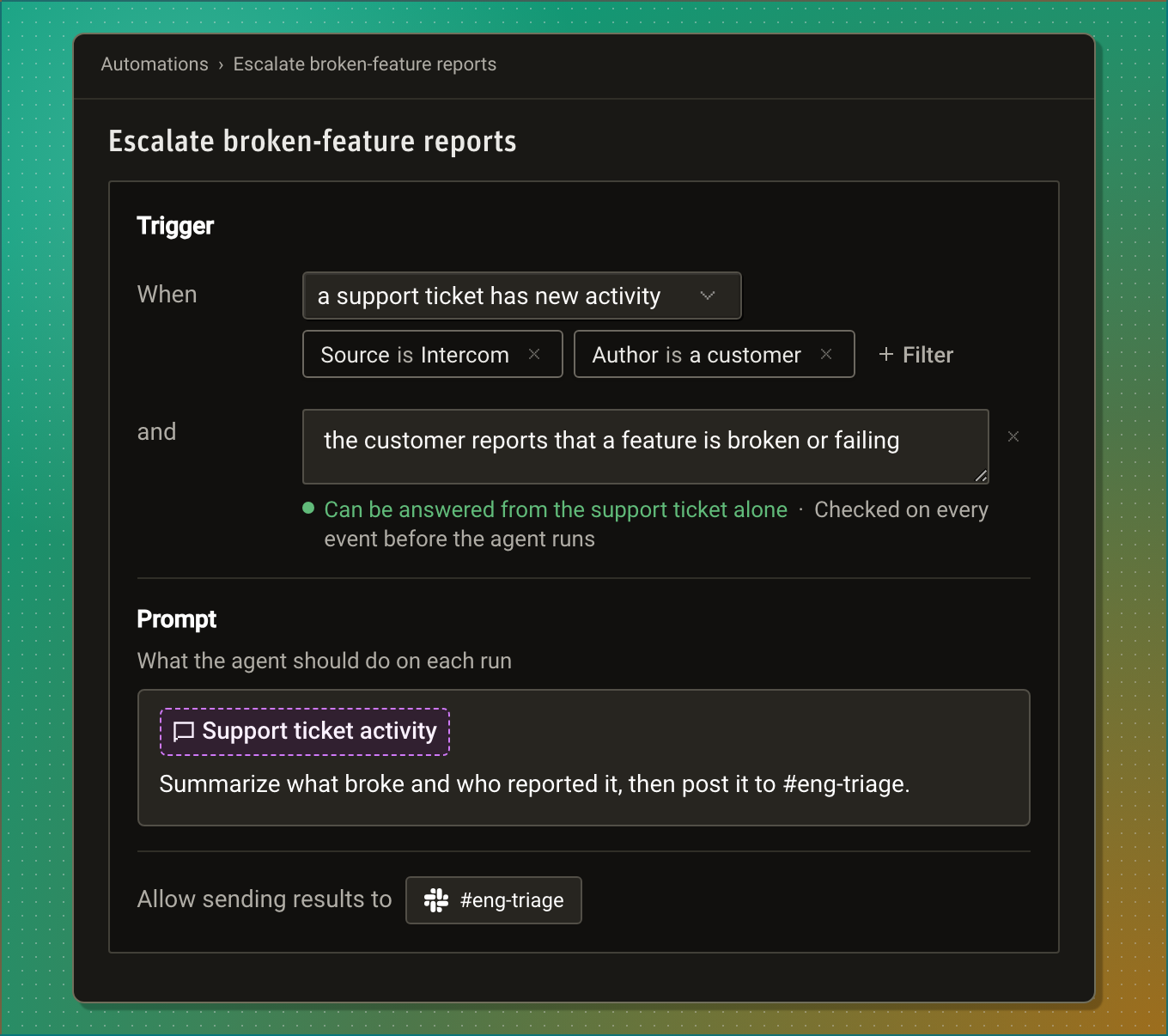
First choose an event, like "a support ticket has new activity", and optionally scope the event using the + Filter selector. In the example above, support ticket activity is filtered to Intercom activity coming from customers.
Here's where smart triggers comes in. You additionally scope the event to trigger on a natural language prompt using the + Analyze button. In the example above, if Jev detects that a customer is reporting a broken product experience, the Modem agent comes alive and sends a triage update to #eng-triage.
This is just one example demonstrating the power of short triggers. Let's talk about some others.
Unlock new workflows
Tickets, calls, pull requests, issues, feedback and posts on X were too noisy to automate on when every event cost a run. Now an automation can subscribe to the whole stream, scope it to a source, channel or state change, and filter it down to the relevant events with your condition.
Here's some recipes you can try today:
Before smart triggers, the agent itself would evaluate these conditions with a slow and expensive frontier-level model - making many workflows cost-prohibitive. But since these conditions are now evaluated with Jev, it's feasible for any organization to run them at any scale.
Create one from your coding agent
Modem today has plugins for Claude, ChatGPT, Cursor, and of course any agent via MCP.
If you've plugged Modem into your agent, you can create smart triggered automations without leaving it.
Ask whichever one you already have open:
Whenever a customer in our help desk reports something broken, summarize it and post to #eng-triage using Modem.
Your agent uses Modem's MCP to create the automation, including the scope and the smart trigger condition.
A new age of customer workflows
Smart triggers and Jev are an exciting new change to the Modem platform. Now you can create bespoke custom workflows, triggered from activity detected in any of your customer channels. You can route concerns to the team that cares most, trigger coding agents to take a first pass, and many other agentic workflows. And the agent only does the work if there's work to be done.
Earlier this month we moved to modem.ai, and launched a whole new website positioned around how we find, fix, and follow up on customer concerns. Smart triggered automations, powered by Jev, is just one step of many we're making to make sure your teams have your customers covered.