The MCP server for customer feedback.
Connect Claude Code, Cursor, ChatGPT, or any MCP-compatible client to Modem and ask about your users in plain language (bug reports, feature requests, complaints) without leaving the tool you work in.







See it on your own data.
Connect your client to mcp.modem.dev
One endpoint, https://mcp.modem.dev/mcp, over Streamable HTTP. Authorization is OAuth, so there is no API key to create or paste. The first connection opens a browser window where you sign in and approve the permissions for one Modem organization. Your client then lists the Modem tools it can see, which is how you know the connection landed.
The server reads your Modem workspace, so connect a source to give it something to answer from. Create one free, or see pricing for what each tier includes.
Claude Code
Terminalclaude mcp add --transport http modem https://mcp.modem.dev/mcpRun /mcp inside Claude Code and finish the browser authorization.
Cursor
mcp.json{
"mcpServers": {
"modem": {
"url": "https://mcp.modem.dev/mcp"
}
}
}Save this as ~/.cursor/mcp.json to use Modem everywhere, or as .cursor/mcp.json inside one project. If Cursor asks for a transport type, choose Streamable HTTP.
ChatGPT
Plugin directoryhttps://chatgpt.com/plugins/plugin_asdk_app_6aa301615af48191a59c3febcdef6ec2Open the Modem listing, or choose Plugins in ChatGPT and search for Modem. Select install, sign in to Modem, and authorize. In a chat, type @ and choose Modem. Developer mode can also add https://mcp.modem.dev/mcp as a connection with OAuth in Business, Enterprise, and Edu workspaces, where an admin turns it on.
VS Code and GitHub Copilot
mcp.json{
"servers": {
"modem": {
"type": "http",
"url": "https://mcp.modem.dev/mcp"
}
}
}Edit the file directly, or run MCP: Add Server from the command palette.
Codex
Terminalcodex mcp add modem --url https://mcp.modem.dev/mcp
codex mcp login modemThe login command opens the same browser flow. Codex stores the server in ~/.codex/config.toml.
opencode
opencode.json{
"$schema": "https://opencode.ai/config.json",
"mcp": {
"modem": {
"type": "remote",
"url": "https://mcp.modem.dev/mcp"
}
}
}Leave the headers field out. opencode prompts you the first time, or you can run opencode mcp auth modem yourself.
Any other MCP client
Connection fieldsName: modem
URL: https://mcp.modem.dev/mcp
Transport: Streamable HTTP
Auth: OAuthUse the client’s own remote HTTP setup flow, and pick OAuth when it asks.
OAuth 2.0 with PKCE. Clients that support dynamic client registration register themselves, so the whole exchange happens on first connect.
data:read covers search. agent:invoke covers agent runs and every write tool together. The organization comes from the token itself, so a tool argument cannot redirect a call to another workspace.
Twenty calls per minute for each tool, counted per organization. Exceeding it returns a retryAfter hint to back off against.
Client-by-client notes, including what to check when a client shows no Modem tools, are in the MCP server documentation. Each block above was checked against its vendor’s own documentation in September 2026. MCP client configuration moves quickly, so check the vendor if a block stops working.
Because coding isn't the slow part
Teams are still spending too many cycles chasing down feedback, curating their backlog, and following up with users. Tedious work often done by a single person who holds all the context and bottlenecks execution. Modem fixes that.
Build what's actually important
Every bug report, every feature request, automatically clustered and prioritized
Unified company & user profiles to understand who matters and who can wait
Spot emerging trends before they become fires
 New Conversation
What are the biggest issues my customers are facing?


Here are three conversations from this week with lots of activity and high priority customers:


 High
High

 High
High Medium
 Product
I've been encountering frequent timeout errors when trying to search in the web app
@modem can you make a ticket for this, include any other relevant conversations, and assign me?
Done! This problem has been mentioned by two external customers as well. I've included a rollup in the ticket.

Timeout issues when searching in web app
Issue ENG-2831 in Linear
Multiple customers have reported timeout errors when searching in the web app. Here is...

Act on problems you didn't know you had
Get alerted to user concerns as they happen, not days later
Create detailed tickets straight from chat or through automations you set up
Delegate tasks to coding agents with the context they need to be successful
Close the loop at scale
Draft follow-ups to customers when their requests ship
Generate user-tailored release notes from GitHub PRs and Linear tickets
Automate personalized recurring digests, triage reports, and more in plain English
New ConversationCan you send our customers release notes every Monday at 9am based on what we've merged?
I created a scheduled task to post release notes for your customers based on your team's Github and Linear history:
Post Release Notes
Every Monday at 9am PT
Would you like me to ask you first with the notes for approval?
Not just an agent – a multiplayer platform
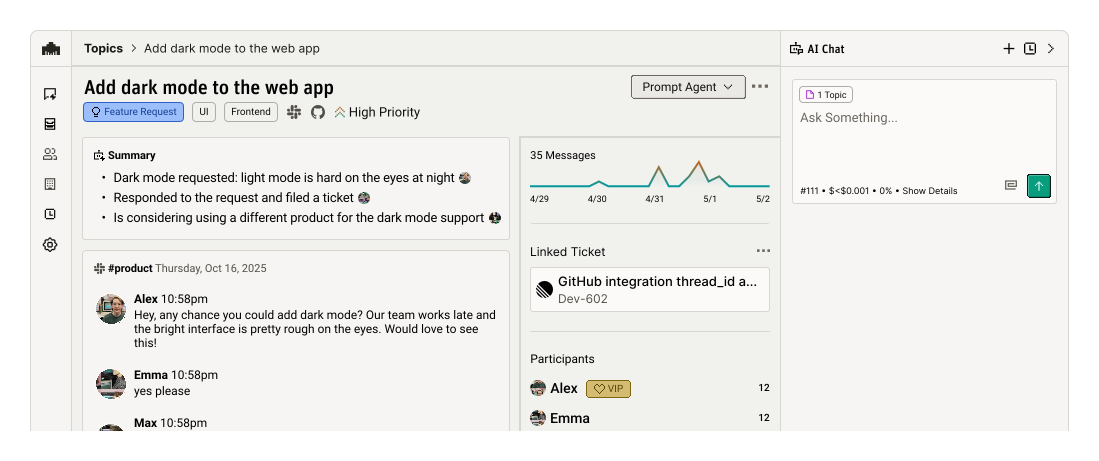
Built on a real-time discussion graph
Long-term memory sourced from user and team discussions
No tagging, no triaging — it just organizes itself
Semantic search that finds what you mean, not just what you type
One topic per problem, with the quotes attached
Modem reads the places your customers already talk, including Slack, Discord, GitHub, Zendesk, Intercom, email, and call transcripts. It groups what it finds into topics as the messages arrive. The MCP server serves those topics, so a question about a login bug comes back as one topic with the people and companies who reported it. The source threads are already merged behind it.
Duplicate reports arrive pre-merged
Reports of the same issue resolve to one topic as they land. The people and companies who raised it come back attached to that topic, so your coding agent can see who hit something from the topic itself.
The original words stay attached
Each topic keeps the customer’s exact quote alongside the person and company behind it. Your agent can quote the report it is acting on.
Reading is separate from writing
Search reads. A second set of tools runs the Modem Agent or edits records, and you grant those as one decision at consent.
Sixteen tools, in three groups
Your client sees only the tools covered by the scopes you approved at consent. A token scoped to data:read sees only the three read-only tools: search_modem, modem_docs, and modem_skills. The nine write tools are annotated as destructive, so most clients ask you to confirm each call before it runs.
Search and help
data:readRead-only, and none of them spend agent credits. The two help tools also come with agent:invoke.
search_modemAsk a natural-language question and get the matching rows back with a short written answer. You can name the columns you want and page through the results.
modem_docsSearch or read Modem’s public docs: setup, integrations, scopes, and the API.
modem_skillsInstructions for using this server’s tools, so your client picks the right one.
Agent runs
agent:invokeRuns the full Modem Agent, which can reach your connected tools. Runs are asynchronous and continue if your client disconnects. Both starting calls require an idempotency_key, and one turn runs at a time per conversation.
modem_agent_invokeStart a run with a prompt and an idempotency_key. Returns a conversation ID and run ID.
modem_agent_get_runPoll for status. Terminal statuses are completed, failed, and cancelled, and a completed run carries the answer.
modem_agent_send_messageSend a follow-up turn once the current run has finished. Needs a fresh key.
modem_agent_cancel_runCancel a run. Work the agent already finished is not undone.
Record maintenance
agent:invokeChanges Modem records directly, without a run. Each call acts as you, under your existing role in the organization, enforced the same way as the dashboard.
update_topicChange one topic: priority, lifecycle state, issue type, keywords, or archived status.
bulk_update_topicsApply one change across up to 100 topics.
merge_topicsMerge up to 50 source topics into a target topic.
create_companiesCreate up to 50 companies, each with a name and a domain.
update_companiesUpdate up to 50 companies: name, primary domain, logo, VIP status, or external links.
merge_companiesMerge source companies into the one you keep.
add_people_to_companyAssociate people with a company.
update_peopleUpdate up to 50 people: display name, email, description, VIP status, or external links.
merge_peopleMerge source people into the one you keep.
Name the columns and the rows come back in that shape
Your client fills these arguments in, so you rarely write them by hand. Ask for columns and the result validates the rows against them under schema. A limit pages the result and usually adds a cursor while rows remain, and every result carries a traceId to quote if you contact support.
// arguments
{
  "question": "Topics with the most feedback from VIP companies in the last 30 days",
  "limit": 25,
  "columns": [
    { "name": "topic_id", "type": "string" },
    { "name": "title", "type": "string" },
    { "name": "feedback_count", "type": "number" }
  ]
}

// result
{
  "answer": "Three topics account for most VIP feedback this month.",
  "rows": [
    {
      "topic_id": "3f9d2a10-8c4e-4b7a-9f21-6e5d0c1b2a34",
      "title": "SSO login loop after session expiry",
      "feedback_count": 11
    }
    // ... 2 more rows
  ],
  "rowCount": 3,
  "complete": true,
  "schema": { "valid": true, "errors": [] },
  "traceId": "..."
}
Every parameter, result field, error code, and limit is documented in the MCP tool reference.
Search first, then write
The write tools take IDs, so a search comes first. Find the records, then act on them. Full parameters for every call below are in the tool reference.
- 1
Ask for the topics
Call search_modem with a question such as "topics about the old billing page with feedback in the last 30 days", and pass the columns you need, each with a name and a type. The result reports whether the rows satisfied that shape.
- 2
Take the IDs from the rows
Topic IDs are UUIDs; company and person IDs are numeric strings. search_modem is how you turn a name or a description into the IDs the write tools expect, which is why it runs ahead of every write.
- 3
Apply the change
Call bulk_update_topics with up to 100 of those IDs to archive or re-prioritize them in one call, or update_topic for a single change. Merges cannot be undone from the client, so check the target before approving.
- 4
Hand off anything that leaves Modem
Write tools stay inside Modem. Anything that reaches further, such as opening a Linear issue, goes through modem_agent_invoke with a prompt describing the context and the action, plus a required idempotency_key. Then poll modem_agent_get_run for the result.
search_modem or an agent run
Start with search_modem and escalate to an agent run when the task needs more than a lookup.
| search_modem | modem_agent_invoke | |
|---|---|---|
| What it does | Answers one natural-language question about your workspace. | Runs the full Modem Agent, which reasons across several steps and can call the tools you have connected. |
| Scope it needs | data:read. This is the only scope search_modem needs. | agent:invoke, the same scope that gates all nine write tools. |
| What it costs | Free. It reads the workspace directly. | Bills against your organization’s agent credit allowance, which the pricing page sets out per tier. |
| When you get the answer | In the same call, with paging for longer result sets. | The call returns a conversation ID and a run ID straight away, and you poll for the result. |
| How far it reaches | Everything in your Modem workspace. Topics, people, and companies, plus the messages behind them and the issues and pull requests linked to them. | Beyond Modem, into your connected tools, acting on your behalf. |
| Reach for it when | You want a lookup or the list of IDs you are about to act on. | The task takes several steps, or it has to create or send something outside Modem. |
Common questions about the Modem MCP server
Is there an MCP server for customer feedback?
Yes. The Modem MCP Server runs at https://mcp.modem.dev/mcp over Streamable HTTP with OAuth, and any MCP-compatible client can connect to it. Modem reads the places your customers talk, including Slack, Discord, GitHub, Zendesk, Intercom, email, and call transcripts, and groups what they say into topics. A question about a login bug comes back as one topic with the people and companies who reported it and their original quotes. The server is in Beta, so the tool surface can still change.
Is there a Modem plugin for ChatGPT?
Yes. Modem Labs Inc. publishes Modem in ChatGPT’s plugin directory at https://chatgpt.com/plugins/plugin_asdk_app_6aa301615af48191a59c3febcdef6ec2. Select install, sign in to Modem, and authorize one organization. In a chat, type @ and choose Modem, then ask something like "Summarize the three highest-priority open topics and who’s affected." The plugin uses this same server and the same two OAuth scopes as every other client.
How do I connect Claude Code to customer feedback?
Run claude mcp add --transport http modem https://mcp.modem.dev/mcp in your terminal, then type /mcp inside Claude Code and finish the browser authorization. Once it connects you should see the Modem tools listed, and you can ask about your customers in the session you are already coding in. The server reads your Modem workspace, so connect a source to give it something to answer from.
What do I need before I can connect to the Modem MCP server?
A Modem account with access to the organization you want to query, and an MCP client that supports remote Streamable HTTP servers with OAuth. Connect at least one source as well, since that is what the server reads. Modem starts free, and the pricing page covers what each tier includes.
Does the Modem MCP server work with Cursor and ChatGPT?
Yes, along with VS Code, GitHub Copilot, Codex, opencode, and any client supporting remote Streamable HTTP servers with OAuth. In Cursor, add an entry with the url https://mcp.modem.dev/mcp to ~/.cursor/mcp.json or to a project .cursor/mcp.json. In ChatGPT, install Modem from the plugin directory. Developer mode is a manual alternative in Business, Enterprise, and Edu workspaces, where an admin turns it on.
Do I need an API key for the Modem MCP server?
No. Authorization is OAuth 2.0 with PKCE, so the token lives in your client and refreshes itself. The first connection opens a browser window where you sign in and approve the requested permissions for one Modem organization. Clients that support dynamic client registration register themselves.
What permissions does the Modem MCP server ask for?
Two scopes. data:read is the read-only option and covers search_modem, plus the two help tools, modem_docs and modem_skills. agent:invoke covers the two help tools, the four agent-run tools, and all nine write tools together, as one decision. Every write is then checked against your own role in the organization, so an approved token stays inside the access your account already has.
Are there rate limits on the Modem MCP server?
Twenty tool calls per minute, counted per organization and per tool. Each of the sixteen tools gets its own allowance, and going over returns a rate-limit error with a retryAfter hint your client should back off against. Agent runs draw on your organization’s agent credit allowance on top of that, while search_modem answers straight from your workspace and stays free.
What tools does Modem's MCP server expose?
Sixteen. One search tool, search_modem, which answers a natural-language question about your workspace and is read-only. Two read-only help tools: modem_docs, which searches Modem’s public docs, and modem_skills, which tells your client how to use the other tools. Four agent-run tools (modem_agent_invoke, modem_agent_get_run, modem_agent_send_message, modem_agent_cancel_run) that run the Modem Agent asynchronously and can reach your connected tools. Nine record-maintenance tools that write to Modem: update_topic, bulk_update_topics, merge_topics, create_companies, update_companies, merge_companies, add_people_to_company, update_people, and merge_people.
Close the product gap