---
title: 'Webhooks'
description: 'Send automation trigger events to your own HTTPS endpoint'
slug: features/webhooks
---
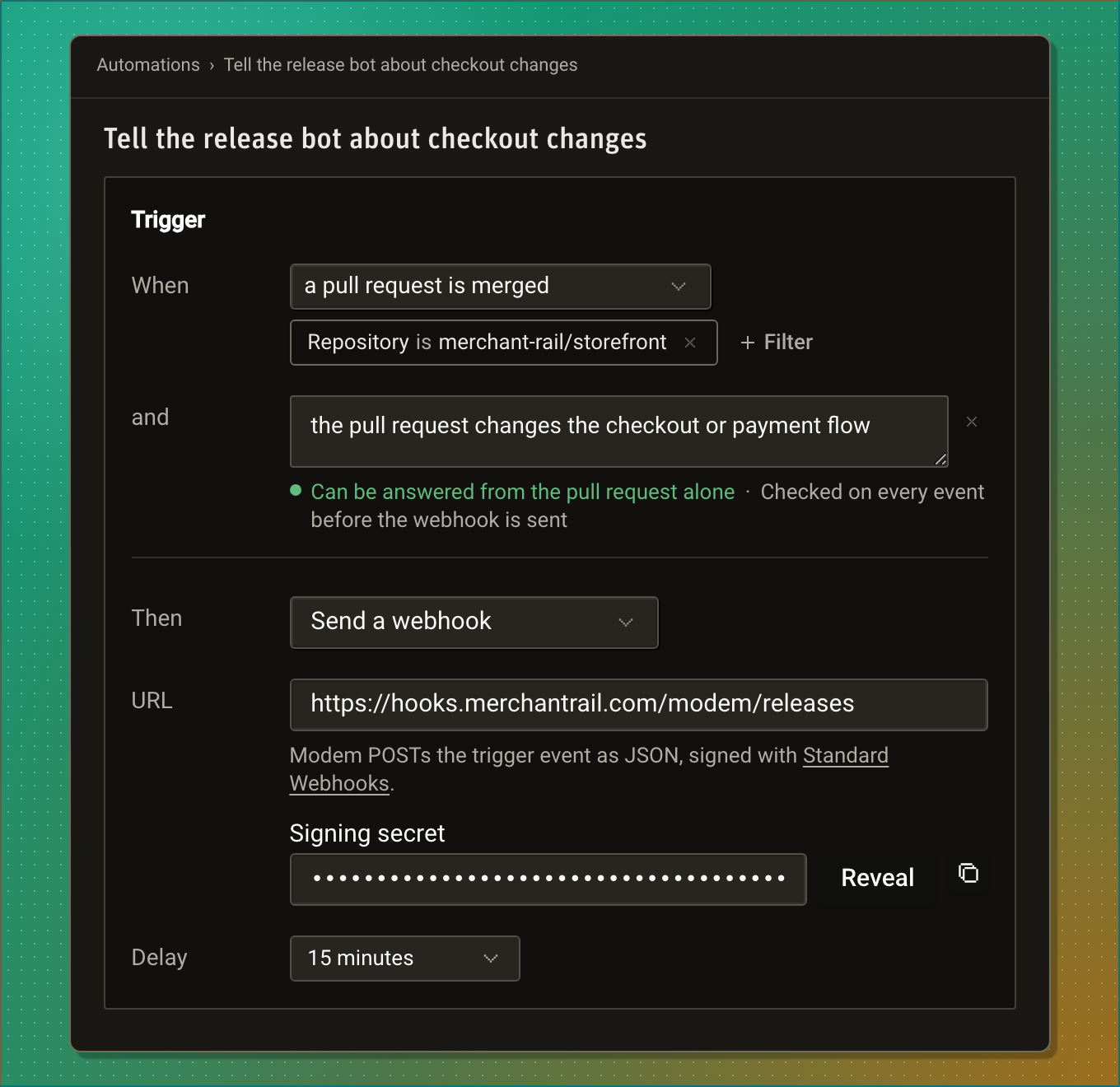
**Webhooks** send an [automation](/docs/features/automations)'s trigger events to a URL you choose instead of running the Modem Agent. Set the automation's **Then** to **Send a webhook**, and each time its trigger fires, Modem POSTs the event to your endpoint as signed JSON.
Use one to feed Modem's events into your own systems: a release bot, a data warehouse, an on-call tool, or an agent you run yourself.
 ## How it works
An automation is a trigger plus an outcome. The trigger says when it runs: an event in a connected tool, or a schedule. The outcome says what a run does. The default outcome runs the agent with your prompt. A webhook outcome delivers the event to your URL instead, so the run has no prompt, uses no tools, and calls no model.
Each delivery is an HTTPS POST with a JSON body and [Standard Webhooks](https://www.standardwebhooks.com) signature headers. Your endpoint verifies the signature with the automation's signing secret, answers with a 2xx status, and handles the event.
## Choose which events you receive
An activity trigger, such as **a customer sends a message** or **a pull request has new activity**, fires for every matching conversation, pull request, or issue in your organization. Modem won't save one without something that narrows it. The form says so under **When**: "Add a filter or an analysis: without one, this automation would run on activity from every pull request in the organization."
There are two ways to narrow a trigger, and you can combine them.
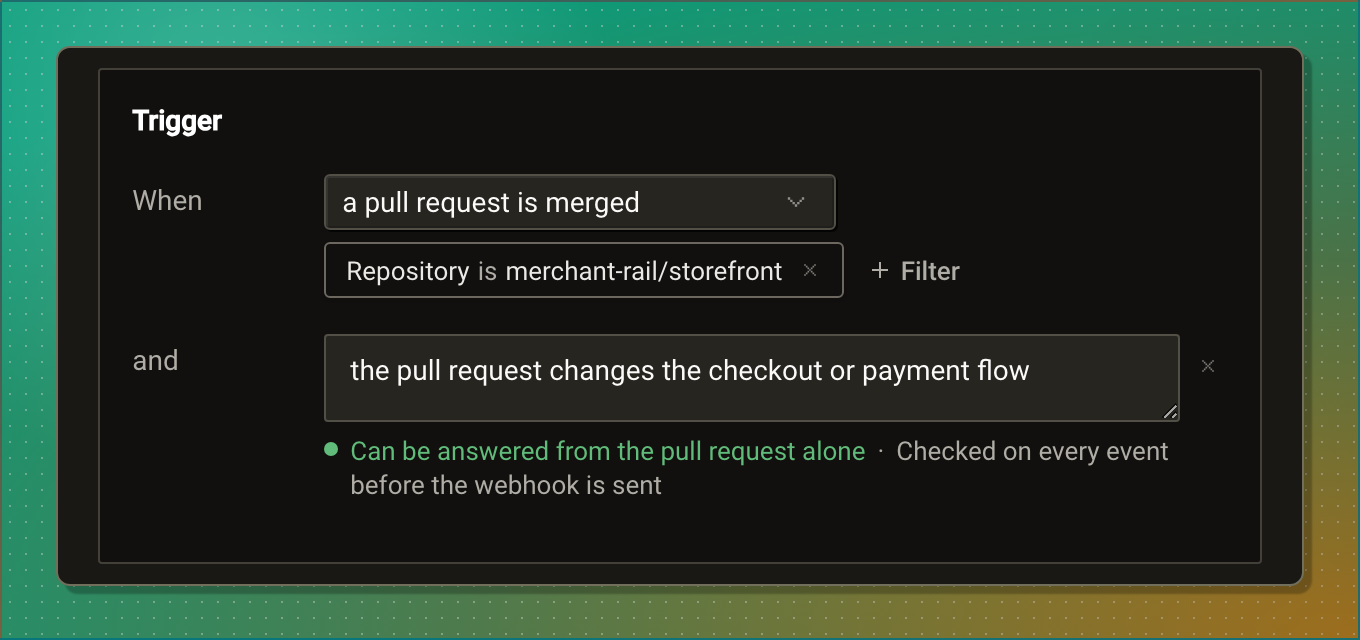
**Filter.** Click **+ Filter** under **When** and pick a field, such as **Repository is merchant-rail/storefront**, **Source is Intercom**, **Author is a customer**, or **Base branch matches ^release/**. Modem matches a filter in code before anything else, so an event it rules out costs nothing and is never delivered. The fields each event offers are listed under [Filters](/docs/features/automations#filters).
**Analyze.** Click **+ Analyze** and describe the events you want in one sentence, such as "the pull request changes the checkout or payment flow". A fast evaluation model reads each event that passes the filter and delivers only the ones that match. If the model is unavailable, or the event is too large for it to read, Modem skips the event rather than deliver it unchecked. See [Trigger conditions](/docs/features/automations#trigger-conditions) for how to write one.
 :::note
A webhook has no agent to fall back on, so its analysis must be answerable from the event alone. The line under the condition tells you as you type: "Can be answered from the pull request alone" means each event is checked before the webhook is sent, and "Can't be answered from the pull request alone, so a webhook can't use it" means saving would fail. Rewrite the condition around fields the event carries, or have the automation run the agent.
:::
When the automation has an analysis, its page lists **Trigger evaluations**: each recent event, whether it **Ran** or was **Skipped**, and counts for the last seven days.
## Set up a webhook
1. **Create or open an automation**
Go to **Automations** in your dashboard, then click **Create Automation** and choose **Create manually**, or open an existing
automation.
2. **Choose the trigger**
Pick a preset or event under **When** and narrow it with a [filter or an analysis](#choose-which-events-you-receive). A scheduled
automation can send a webhook too; its deliveries carry the [run context](/docs/features/automations#run-context) as their event.
3. **Send a webhook**
Under **Then**, choose **Send a webhook** and enter the **URL**. It must start with `https://`, carry no username, password, or
fragment, and point at a public host. Modem refuses localhost, private, and link-local addresses when you save and again before each
delivery.
4. **Set a delay, if you want one**
**Delay** waits up to 7 days after the event before delivering. The analysis is still checked when the event fires, against the
event as it was then.
5. **Save and copy the signing secret**
Once saved, the **Signing secret** appears under the URL, masked. Click **Reveal** to see it or the copy button to copy it. Only
people who can edit the automation can see it; the API and MCP tools never return it.
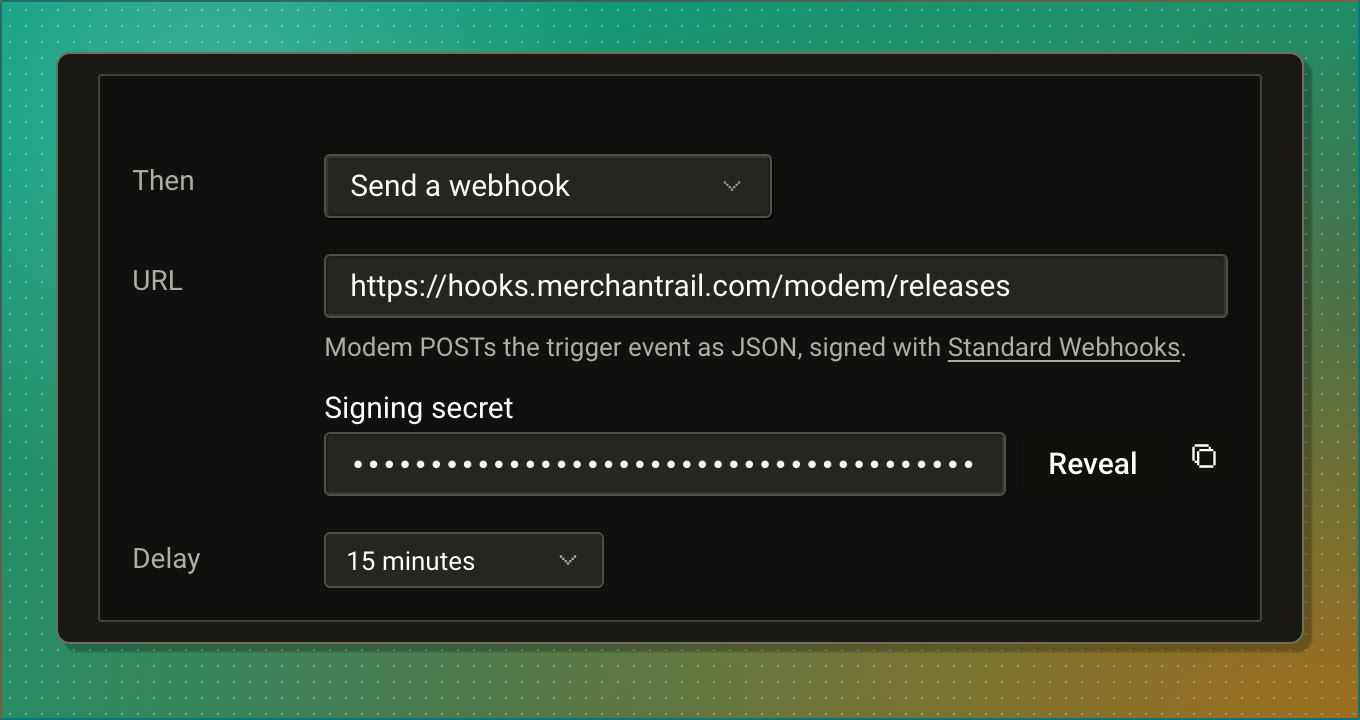 Changing the URL keeps the secret. Switching **Then** back to **Run the Modem agent** deletes the webhook and its secret; switching to a webhook again creates a new one.
You can also create a webhook automation over MCP with `create_automation` and `outcome: { "type": "webhook", "url": "…" }`; see [Automation tools](/docs/api/mcp-tools#automation-tools). The public `/v1` API creates automations that run the agent only.
## What Modem sends
Every delivery is a POST with `content-type: application/json` and this body:
```json
{
"id": "msg_3f9c2a71-8d4e-5b16-a0c3-7e52d9b4f018",
"type": "automation.triggered",
"created_at": "2026-10-16T09:42:11.000Z",
"organization_id": "1842",
"automation": {
"id": "018f6b2a-0000-7000-8000-000000000902",
"name": "Tell the release bot about checkout changes"
},
"event": {
"name": "pull_request.activity",
"data": {
"change": {
"kind": "merged",
"occurred_at": "2026-10-16T09:42:10.000Z",
"actor": { "name": "Jordan Mercer", "handle": "jmercer", "email": null, "role": "staff" }
},
"source": { "name": "github", "container_kind": "pull_request" },
"pull_request": {
"key": "github:2319077512",
"url": "https://github.com/merchant-rail/storefront/pull/1287",
"number": 1287,
"title": "Retry a declined card once before failing checkout",
"state": "merged",
"repository": { "full_name": "merchant-rail/storefront" },
"base_ref": "main",
"labels": ["checkout", "payments"]
},
"topic": { "id": "t-checkout-declined-retry", "title": "Checkout fails after one declined card" },
"people": [],
"customer": null,
"products": [{ "id": "prod-checkout", "name": "Checkout" }]
}
}
}
```
That delivery is what the automation in the screenshots sends: a pull request merged into `merchant-rail/storefront` that the analysis judged to change the checkout flow. Its `data` is shortened here. A real delivery carries every field of the [Pull Request Activity example](/docs/features/automations#pull-request-activity), including `pull_request.body`, `recent_comments`, the people involved, and the full topic.
| Field | Value |
| ----------------- | ----------------------------------------------------------------------------------------------------------------------------------------- |
| `id` | The delivery's id, the same value as the `webhook-id` header. It stays the same across retries of one delivery, so deduplicate on it. |
| `type` | Always `automation.triggered`. Branch on `event.name`, not on `type`. |
| `created_at` | When the run started, as an ISO 8601 timestamp. The same on every retry. |
| `organization_id` | Your Modem organization's id. |
| `automation` | The automation's `id` and `name`, so one endpoint can serve several automations. |
| `event` | The event: its `name` and its `data`. A scheduled automation sends `schedule.tick`. `null` only for **Run Once** of a trigger automation. |
### Event data
`event.data` is the same context the agent would have been given, unchanged.
The activity events (`chat.activity`, `call.activity`, `support_ticket.activity`, `feedback.activity`, `social_post.activity`, `pull_request.activity`, `issue.activity`, and `topic.activity`) send the nested payloads shown under [Example payloads](/docs/features/automations#example-payloads), field for field. Each conversation event carries the recent messages, the people and customer company, the topic, and the products; a pull request or issue event carries the change, the pull request or issue with its newest comments, and the same people, company, topic, and products. A topic event carries the change, the topic, how many customers and people are on it, the main customer company, and the products, with no message text.
The other events send a flat object. Modem's own topic events:
| Event | `data` |
| --------------------- | --------------------------------------------------------------------------------------------------------------------------------------- |
| `topic.created` | `topic_id`, `topic_title`, and `topic_summary` (may be null) |
| `topic.priority.high` | `topic_id`, `previous_priority`, `new_priority`, and `topic_priority_context`, a text summary of why the priority rose, when one exists |
A `topic.created` delivery:
```json
{
"id": "msg_b81e64d0-2c95-5f7a-9d38-41a6e0c7b2f5",
"type": "automation.triggered",
"created_at": "2026-10-16T10:03:27.000Z",
"organization_id": "1842",
"automation": {
"id": "018f6b2a-0000-7000-8000-000000000903",
"name": "New topics to the data warehouse"
},
"event": {
"name": "topic.created",
"data": {
"topic_id": "t-revenue-chart-spinner",
"topic_title": "Revenue chart never loads",
"topic_summary": "The dashboard revenue chart stays on its loading spinner for some accounts."
}
}
}
```
The Stripe events carry the ids and a few fields of the Stripe object: `stripe.customer.created` sends `customer_id`, `customer_email`, and `customer_name`; the subscription events send `subscription_id`, `customer_id`, `customer_email`, `plan_name`, and the status, amount, or cancellation details; `stripe.invoice.payment_failed` sends `invoice_id`, `customer_id`, `subscription_id`, `amount_due`, `currency`, and `attempt_count`. Fields Stripe had no value for are null.
A scheduled automation sends `schedule.tick`, whose `data` is the [run context](/docs/features/automations#run-context): when the automation last ran successfully and what changed since then. Its schedule's [filter](/docs/features/automations#skip-a-scheduled-run-with-nothing-to-do) decides which runs are delivered.
```json
{
"id": "msg_7c9e6679-7425-50de-944b-e07fc1f90ae7",
"type": "automation.triggered",
"created_at": "2026-11-09T09:00:00.000Z",
"organization_id": "1842",
"automation": {
"id": "0193a1f2-6c4e-7b1a-9d3e-5f2a8c7b4e10",
"name": "Weekly activity to the data warehouse"
},
"event": {
"name": "schedule.tick",
"data": {
"automation": { "id": "0193a1f2-6c4e-7b1a-9d3e-5f2a8c7b4e10", "run_id": "7c9e6679-7425-50de-944b-e07fc1f90ae7" },
"schedule": {
"kind": "cron",
"slot_at": "2026-11-09T09:00:00.000Z",
"timezone": "Europe/Berlin",
"previous_run_at": "2026-11-02T09:00:00.000Z"
},
"window": { "from": "2026-11-02T09:00:00.000Z", "to": "2026-11-09T09:00:00.000Z" },
"ingest": { "activity": "some", "last_event_at": "2026-11-09T08:57:12.000Z" },
"topics": { "activity": "some", "created": 4, "updated": 11 },
"organization": { "activity": "some" },
"integrations": { "connected": ["github", "linear", "slack", "zendesk"] },
"outputs": { "default": { "channel": "slack" } }
}
}
}
```
If Modem can't build the run context, the run fails and nothing is delivered, so a scheduled delivery always carries its event.
## Receive deliveries
Answer every delivery with a 2xx status within 10 seconds. Modem ignores the response body, so acknowledge first and do the work afterwards. The 10 seconds cover the DNS lookup, the request, and reading your response.
Deliveries come from `34.70.85.166` and `34.9.237.160`. If your endpoint accepts traffic only from known IP addresses, allow both.
Modem retries a delivery that fails in a way another attempt could fix: a 408, 429, or 5xx response, a timeout, a dropped connection, or a failure on Modem's side (`relay_error`). It makes up to 6 attempts with exponential backoff starting at 10 seconds, about 5 minutes in all. Every attempt carries the same `webhook-id` and body, with a fresh `webhook-timestamp` and signature.
Modem does not retry any other 4xx response, a 413, a redirect (it never follows one), a TLS failure, or a body over 256 KiB. A delivery that fails for good marks the automation's run as failed, and the run's history on the automation's page records why, as a category and status such as `http_4xx (404)`.
Deliveries are not guaranteed to arrive in order. Two events 55 ms apart can reach you reversed, and a retried delivery arrives after newer ones. Deduplicate on `id`, and order by the event's own time, `event.data.change.occurred_at` for a pull request or issue, or by `created_at`.
## Verify the signature
Each delivery carries the three [Standard Webhooks](https://www.standardwebhooks.com) headers:
| Header | Value |
| ------------------- | -------------------------------------------------------------------------------------------------------------------------------------------------------------------- |
| `webhook-id` | The delivery's id, equal to `id` in the body. |
| `webhook-timestamp` | When this attempt was signed, in Unix seconds. |
| `webhook-signature` | `v1,` followed by the base64 HMAC-SHA256 of `..`, keyed with the secret. Several signatures can appear separated by spaces. |
The signing secret is `whsec_` followed by base64. The key is the decoded base64 part. Sign over the raw request body, byte for byte, not over re-serialized JSON.
The official `standardwebhooks` library verifies a delivery in one call and rejects a timestamp more than five minutes from your clock:
```ts
import { Webhook } from 'standardwebhooks';
const webhook = new Webhook(MODEM_WEBHOOK_SECRET);
type ModemDelivery = { id: string; event: { name: string; data: unknown } | null };
// Express, with the raw body kept as a string or Buffer.
app.post('/webhooks/modem', express.raw({ type: 'application/json', limit: '256kb' }), (req, res) => {
let delivery: ModemDelivery;
try {
delivery = webhook.verify(req.body, req.headers as Record) as ModemDelivery;
} catch {
res.sendStatus(401);
return;
}
res.sendStatus(200);
if (delivery.event?.name === 'pull_request.activity') {
// delivery.event.data is the Pull Request Activity payload
} else if (delivery.event?.name === 'schedule.tick') {
// delivery.event.data is a scheduled run's run context
}
});
```
Without a library, in Node:
```ts
import { createHmac, timingSafeEqual } from 'node:crypto';
function isModemDelivery(secret: string, headers: Record, rawBody: string): boolean {
const key = Buffer.from(secret.replace(/^whsec_/, ''), 'base64');
const id = headers['webhook-id'];
const timestamp = headers['webhook-timestamp'];
if (!id || !timestamp || Math.abs(Date.now() / 1000 - Number(timestamp)) > 300) return false;
const expected = createHmac('sha256', key).update(`${id}.${timestamp}.${rawBody}`).digest();
return (headers['webhook-signature'] ?? '').split(' ').some((candidate) => {
const [version, signature] = candidate.split(',');
if (version !== 'v1' || !signature) return false;
const actual = Buffer.from(signature, 'base64');
return actual.length === expected.length && timingSafeEqual(actual, expected);
});
}
```
## Related
**[Automations](/docs/features/automations)**
Triggers, filters, analyses, and the full example payload for each activity event.
**[Automation tools](/docs/api/mcp-tools#automation-tools)**
Create a webhook automation from your coding agent over MCP.
**[GitHub](/docs/integrations/github)**
Pull request and issue activity as a trigger.
**[In-app Feedback](/docs/integrations/in-app-feedback)**
Forward each feedback submission the moment it arrives.